
Is there a free app to measure the speed of passing cars?
Yes. SpeedCam AI shows the speed of passing cars on your iPhone free, for as long as you like, and keeps every session you record. Pro is optional, and it opens those sessions in full.
Yes. SpeedCam AI is free to download, and live speeds are free. Set your iPhone in a window, tap Start Detecting, and each passing car’s speed shows on screen, with no time limit, no account and no sign-up. The session is recorded as you go and kept on your iPhone, locked. You see its vehicle count, typical speed and share over the limit, and each vehicle over your limit by the margin you choose (5 mph by default) with its photo. Pro is optional. It shows every photo of each recorded incident, the charts of your street and the PDF report, and adds optional video clips. Pro Annual is $19.99 a year with a 3-day free trial for new subscribers, and Pro Lifetime is $59.99 once. Prices are in US dollars, and the App Store shows yours in your currency.
Free or Pro
| Free | Pro | |
|---|---|---|
| Live speeds on screen | Yes, no time limit | Yes |
| Measured camera height, for more accurate speeds | Yes | Yes |
| Sessions recorded and kept on your iPhone | Yes, locked | Yes, open |
| Vehicles, typical speed, share over the limit and 85th percentile of your sessions | Yes | Yes |
| Charts, the When screen and the PDF report | Demo data and unlocked recordings | Every session |
| Photos of vehicles over your limit by the margin you choose | The photo on each card | Every photo |
| Video clips | No | Yes |
| Campaign names, to compare sets of sessions | Figures only | With charts |
| Counting the traffic in a video you already have | No | Yes |
| IP and security cameras and webhooks | No | Yes |
| Keep in iCloud | No | Yes |
| Price | Free | $19.99 a year after a 3-day free trial, or $59.99 once |
The full list is on Pricing.
What you see for free
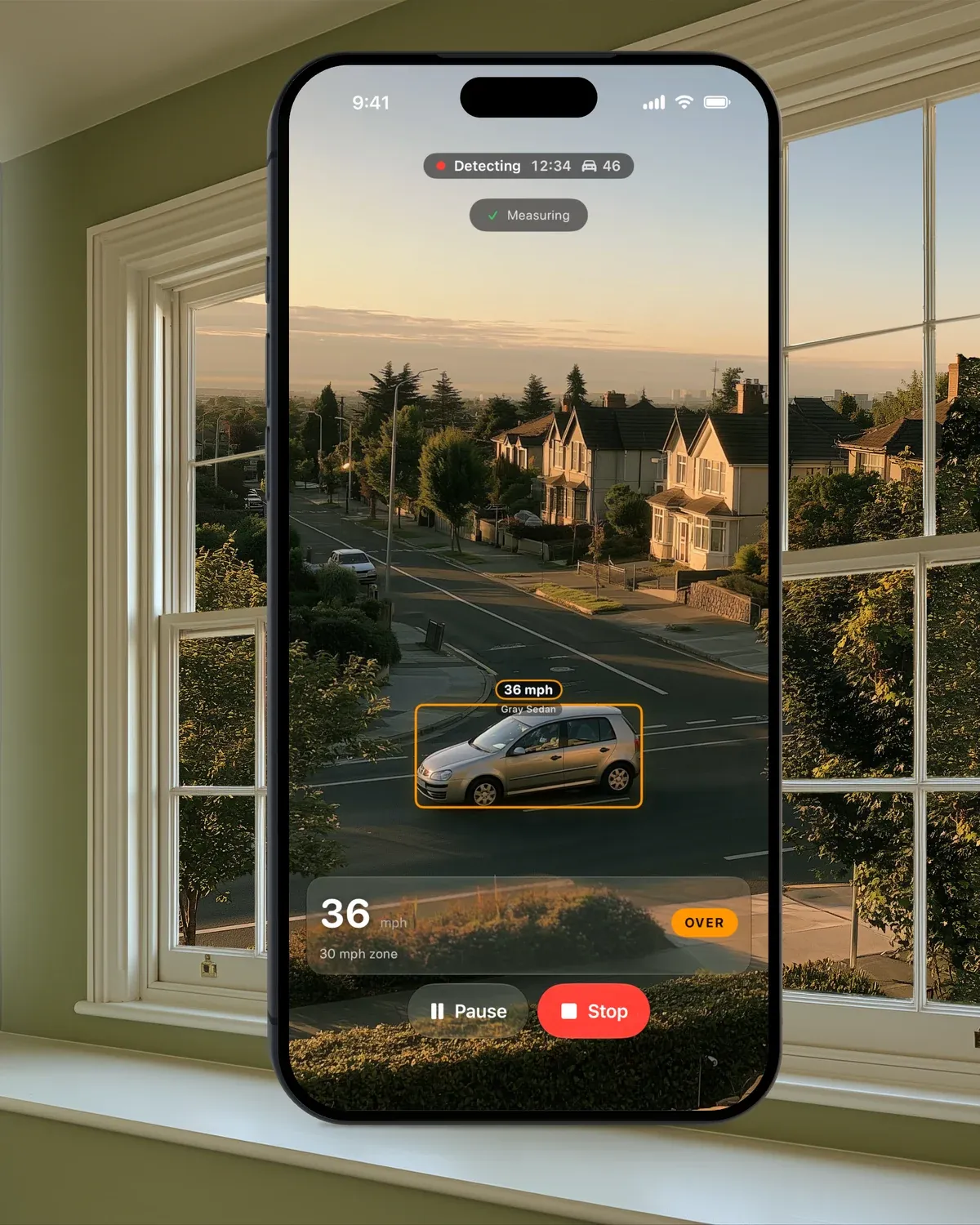
Tap Start Detecting and the app shows the speed of cars and motorcycles as they pass, for as long as you like. It records the session as it goes, as a Pro session does, counting each vehicle and saving the vehicles over your limit by the margin you choose with photos. Video clips need Pro. Without Pro, the session is kept on your iPhone, locked until you start Pro. Analytics shows its basics on the Locked card (vehicles, typical speed, the share over the limit, average and peak speed and the 85th percentile), and Incidents shows each recorded incident with its photo, its speed and a lock. Pro opens the rest, with each vehicle’s photos, the charts and the PDF report.
Where your recordings go
Vehicles are detected on your iPhone, and your recordings are never sent to us. Photos and clips stay on the phone unless you turn on Keep in iCloud (Pro), which stores them in your own iCloud Drive.
Next steps
- Pricing: every feature, free and Pro
- Measure the speed of passing cars with your iPhone
- Speed gun for cars, or the iPhone in your window
- Support: setup and answers
Questions, answered.
Is SpeedCam AI free?
Yes. SpeedCam AI is free to download, and live speeds on screen are free with no time limit and no account. Recording is free too. Every session is kept on your iPhone, locked, with its vehicle count, typical speed and share over the limit open. Pro is optional. It opens the rest, with every photo, the charts and the report, and adds video clips. Pro Annual is $19.99 a year with a 3-day free trial for new subscribers, and Pro Lifetime is $59.99 once.
How can I check the speed of cars on my street for free?
Set your iPhone in a window, looking across the road, open SpeedCam AI and tap Start Detecting. The speed of passing cars shows on screen, free, with no account, and the session is kept on your iPhone, locked until you start Pro.
What does a locked session show?
In Analytics, a locked session shows its vehicles, typical speed, share over the limit, average and peak speed and 85th percentile. In Incidents, each recorded incident shows its photo, its speed and a lock. A tap offers Pro, which shows every photo of each incident, the charts and the PDF report.
Is there a free trial of Pro?
Yes. Pro Annual starts with a 3-day free trial for new subscribers, then renews every 12 months until you cancel. The trial starts in the app, through Apple’s in-app purchase.
Do I need an account?
No. There is no sign-up for live speeds or for Pro. Purchases go through your Apple Account.
Can I see the charts before I pay?
Yes. Tap Load Demo Data on an empty Incidents or Analytics screen, and every chart, the When screen and the PDF report fill with sample traffic.
How do I cancel?
Through Apple: in the Settings app, tap your name, then Subscriptions, then SpeedCam AI. Pro Lifetime is one payment and never renews.
What happens to my recordings if Pro ends?
Nothing is deleted. If you paid for Pro, everything you recorded before it ended stays open on your iPhone, and new sessions are kept there, locked until you start Pro again. If your only Pro was a free trial that ended without a purchase, or every Pro payment was refunded, your recordings stay on your iPhone, locked until you start Pro.
Which iPhones does it run on?
Any iPhone that runs iOS 26.